Table of Tour Content: PortfolioDirect
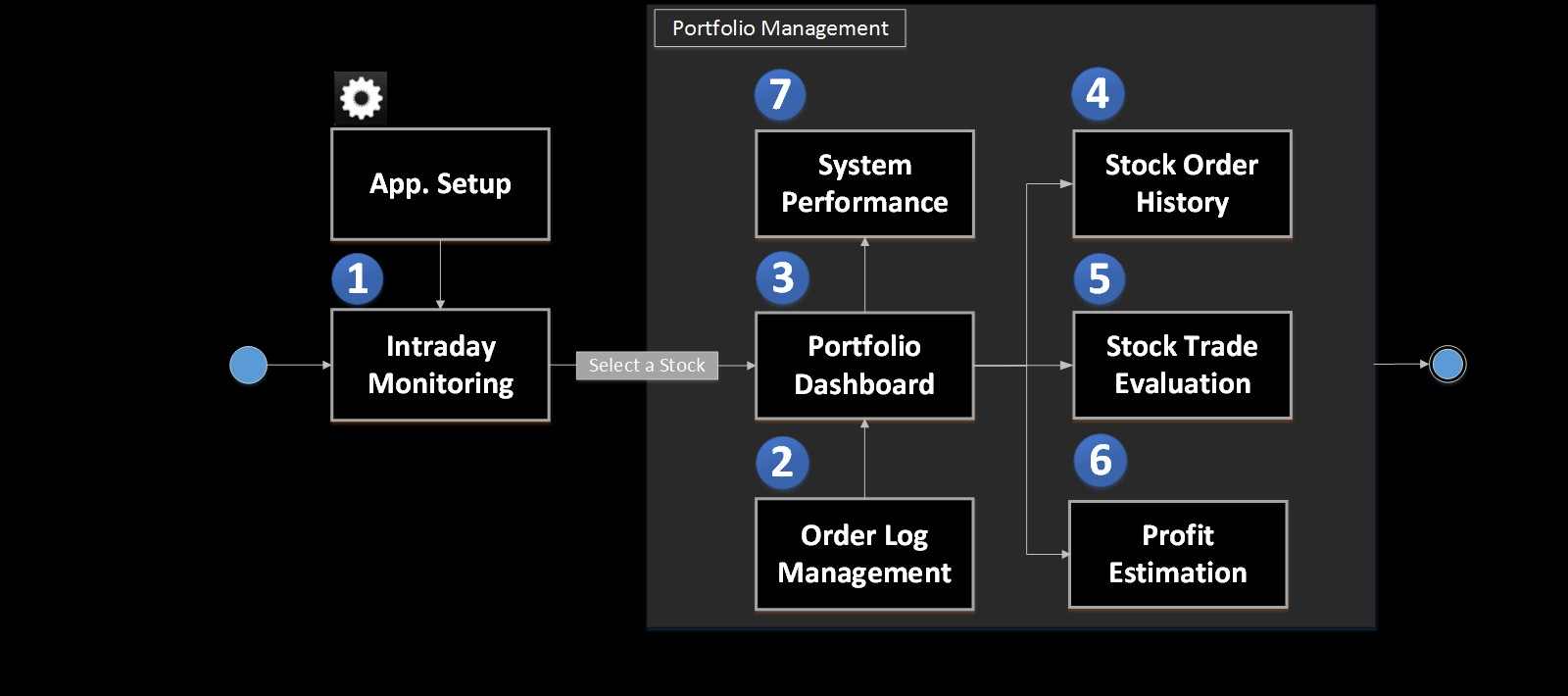
You need to setup following modules before using the application:
- Add stock in the system,
- Select a source for financial data download, and
- Add trading objective.
This module demonstrates users the functionalities in managing market's intraday information:
- The intraday watchlist,
- The intraday charts, and
- The stock ticker, etc.
This module demonstrates users the functionalities in managing the order logs in the system:
- The Order Log Editor, and
- The stock order history.
This module demonstrates users the functionalities in 'Portfolio Management':
- The 'Stock' ticker,
- The 'In Position' list, and
- The 'Recent Orders' list, etc.
This module shows case of the trade order related features:
- The order list,
- The Shares chart, and
- The value chart, etc.
This module shows case of the trading evaluation related features:
- The evaluation result list,
- The profit chart, and
- The return percentage chart, etc.
The Application Calculator Set is designed to assist users in:
- Position sizing the investment, and
- Estimating the potential profit/loss for the investment.
This module shows case of the trading evaluation related features:
- The evaluation result list,
- The profit chart, and
- The return percentage chart, etc.


